Fiber settings
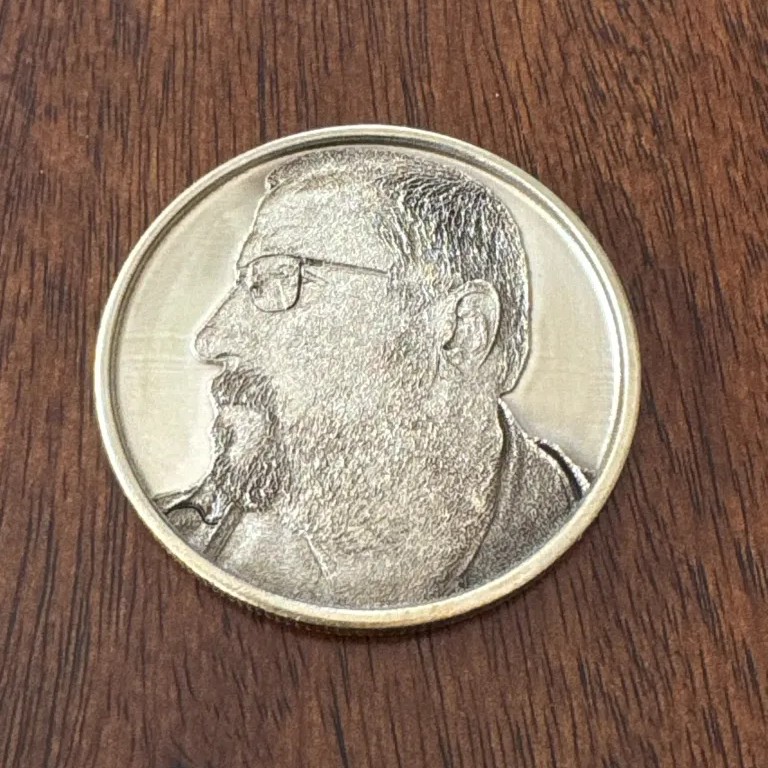
3D Slice Brass Coin Engraving
Shared by Frank Cox
Community settings are starting points, not safety guarantees. Confirm units, material hazards, machine compatibility and your own test results before use.
Material and process
- Material
- Brass
- Coating
- None
- Thickness
- Not recorded
- Revision
- 2
Published rig
- Source manufacturer
- Raycus
- Source model
- RFL-P50QB
- Laser type
- Fiber
- Power
- Not recorded
- Wavelength
- 1064 nm
- Optics
- scan
- Lens manufacturer
- Not recorded
- Lens model
- Not recorded
- Focal length
- Not recorded
- Field size
- 50 × 50 mm
Fill 1
- Air
- No
- Auto
- No
- Pass
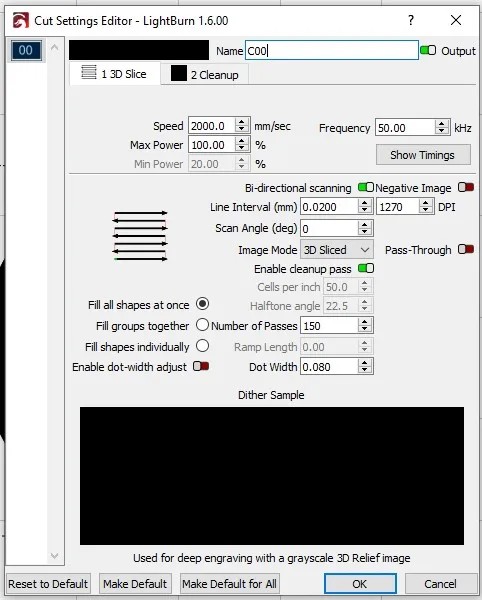
- 150
- Type
- bi
- Angle
- 0
- Cross
- No
- Flood
- No
- Power
- 100
- Pulse
- 200
- Speed
- 2000
- Interval
- 0.02
- Fill name
- Fill 1
- Frequency
- 50
Repeat All
- Recorded value
- 1
Material Color
- Name
- Gold
- Colors
- #C6E583
Focus Offset Raw
- Recorded value
- 0
Material Opacity
- Opacity
- Opaque
Notes
I set this up with the Image Mode called “3D Sliced” and ran 150 passes. I also enabled a cleaning pass after every 10 passes. I use a wire brush on my Dremel to clean it up.
Use this setting in your workshop
Build a rig, inspect compatibility, edit libraries and export settings in the free desktop app.
Get the desktop appImages