Fiber settings
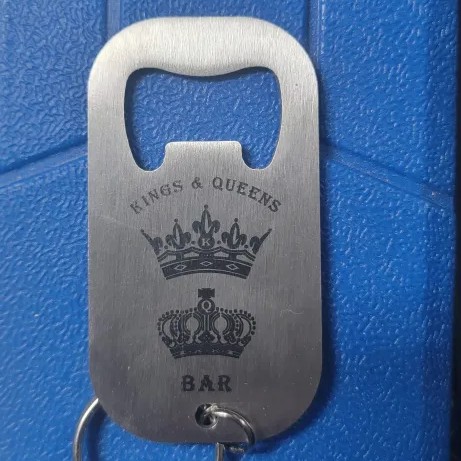
Black Mark on Stainless Steel
Shared by Justin Kerns
Community settings are starting points, not safety guarantees. Confirm units, material hazards, machine compatibility and your own test results before use.
Material and process
- Material
- Stainless Steel
- Coating
- None
- Thickness
- Not recorded
- Revision
- 2
Published rig
- Source manufacturer
- JPT
- Source model
- YDFLP-80-M7-M-R
- Laser type
- Fiber
- Power
- 80 W
- Wavelength
- 1064 nm
- Optics
- scan
- Lens manufacturer
- Not recorded
- Lens model
- Not recorded
- Focal length
- Not recorded
- Field size
- 110 × 110 mm
Fill 1
- Air
- No
- Auto
- No
- Pass
- 1
- Type
- bi
- Angle
- 90
- Cross
- No
- Flood
- No
- Power
- 12
- Pulse
- 200
- Speed
- 300
- Interval
- 0.08
- Fill name
- Black Pass
- Frequency
- 100
Repeat All
- Recorded value
- 1
Material Color
- Name
- Silver
- Colors
- #969696
Focus Offset Raw
- Recorded value
- 0
Material Opacity
- Opacity
- Opaque
Notes
Q pulse is turned off. Looks good from many angles Smooth (like butter)
Use this setting in your workshop
Build a rig, inspect compatibility, edit libraries and export settings in the free desktop app.
Get the desktop appImages
Published files
- 20231220_195048rotated.jpgJPG · 65 KiBDownload
